PYNQ-Z1 bringup
The PYNQ-Z1 board is the hardware platform for the PYNQ open-source framework. It features a Zynq-7000 (XC7Z020-1CLG400C) All Programmable System-On-Chip (APSoC), integrating a feature-rich dual-core Cortex-A9 based processing system (PS) and Xilinx programmable logic (PL) in a single device. Figure 1 shows an image of the PYNQ-Z1 development board by Digilent.
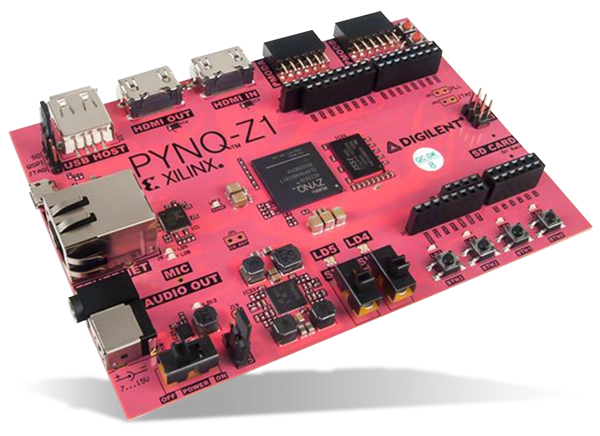
Digging into the hardware architecture of this board is out of scope of this text, so if you are interested in more details, have a look at the Zynq Technical Reference manual.
We will go through a brief description of the software components needed to bring up the board We describe the process to install a linux distribution and verify that the board can execute a simple example.
Software components
Bringing up the PYNQ-Z1 board is fairly straight-forward:
- Option 1: use the vendor-provided SD card image for PYNQ-Z1 v3.0.1 from the official website.
- Option 2: use a custom linux distribution; build u-boot, the linux kernel/modules and a generic rootfs of the preferred linux distro, using the tools you are most familiar with.
We will go with Option 2, following the guide provided by Ichiro Kawazome.
Install a linux distribution on the PYNQ-Z1 board
First, we will create a target directory that will host the contents of the SD card image: the early boot files, the linux kernel and drivers, and the user-space utilities.
mkdir -p target
mkdir -p target/boot
- Step 1: Build
u-boot. - Step 2: Build the Linux kernel
- Step 3: Build the rootfs (Debian 11)
- Step 4: Build Drivers and Services
Step 1: Build u-boot
Get the patches/scripts:
git clone --depth=1 -b v2016.03-1 https://github.com/ikwzm/FPGA-SoC-U-Boot-PYNQ-Z1.git
We need to build u-boot-spl.sfp and u-boot.img. The steps are outlined below:
- Download U-boot Source
git clone git://git.denx.de/u-boot.git u-boot-2016.03-zynq-pynq-z1
Pick the supported version:
cd u-boot-2016.03-zynq-pynq-z1
git checkout -b u-boot-2016.03-zynq-pynq-z1 refs/tags/v2016.03
Apply a number of patches, specific to PYNQ-Z1:
patch -p0 < ../files/u-boot-2016.03-zynq-pynq-z1.diff
git add --update
git add arch/arm/dts/zynq-pynqz1.dts
git add board/xilinx/zynq/pynqz1_hw_platform/*
git add configs/zynq_pynqz1_defconfig
git add include/configs/zynq_pynqz1.h
git commit -m "patch for zynq-pynq-z1"
git tag -a v2016.03-zynq-pynq-z1-1 -m "Release v2016.03-1 for PYNQ-Z1"
Patch for the breaking changes of OpenSSL v1.1.x:
wget https://blog.cloudkernels.net/pynq/0001-fix-build-with-OpenSSL-1.1.x.patch
git am 0001-fix-build-with-OpenSSL-1.1.x.patch
Setup for Build:
cd u-boot-2016.03-zynq-pynq-z1
export ARCH=arm
export CROSS_COMPILE=arm-linux-gnueabihf-
make zynq_pynqz1_defconfig
Build u-boot & extract binaries:
make
# Copy u-boot.img, u-boot.elf and u-boot-spl.sfp to root directory
cp spl/boot.bin ../boot.bin
cp u-boot.img ../u-boot.img
cp u-boot ../u-boot.elf
cd ..
Copy boot.bin and u-boot.img to target/boot/:
shell$ cp boot.bin   ../target/zynq-pynqz1/boot/
shell$ cp u-boot.img ../target/zynq-pynqz1/boot/
Step 2: Build the Linux Kernel
Let’s go back to our working director (cd ../) and get the repo sources (we
will need some PYNQ-Z1 specific patches):
wget https://github.com/ikwzm/FPGA-SoC-Linux/archive/refs/tags/v2.1.1.tar.gz
tar -zxvf v2.1.1.tar.gz
cd FPGA-SoC-Linux-2.1.1
Get the kernel sources (v5.10.109):
git clone --depth 1 -b v5.10.109 git://git.kernel.org/pub/scm/linux/kernel/git/stable/linux-stable.git linux-5.10.109-armv7-fpga
cd linux-5.10.109-armv7-fpga
git checkout -b linux-5.10.109-armv7-fpga refs/tags/v5.10.109
Patch for armv7:
patch -p1 < ../files/linux-5.10.109-armv7-fpga.diff
git add --update
git add arch/arm/configs/armv7_fpga_defconfig
git add arch/arm/boot/dts/zynq-pynqz1.dts
git commit -m "patch for armv7-fpga"
Patch for usb chipidea driver:
patch -p1 < ../files/linux-5.10.109-armv7-fpga-patch-usb-chipidea.diff
git add --update
git commit -m "patch for usb chipidea driver for issue #3"
Patch for build debian package script:
patch -p1 < ../files/linux-5.10.109-armv7-fpga-patch-builddeb.diff
git add --update
git commit -m "patch for scripts/package/builddeb to add tools/include and postinst script to header package"
Create tag and .version:
git tag -a v5.10.109-armv7-fpga -m "release v5.10.109-armv7-fpga"
echo 1 > .version
Setup for Build:
cd linux-5.10.109-armv7-fpga
export ARCH=arm
export CROSS_COMPILE=arm-linux-gnueabihf-
make armv7_fpga_defconfig
Build Linux Kernel and device tree:
export DTC_FLAGS=--symbols
make deb-pkg
make zynq-zybo.dtb
make zynq-zybo-z7.dtb
make zynq-pynqz1.dtb
make socfpga_cyclone5_de0_nano_soc.dtb
Copy zImage to vmlinuz-5.10.109-armv7-fpga:
cp arch/arm/boot/zImage ../vmlinuz-5.10.109-armv7-fpga
Copy devicetree to target/boot/:
cp arch/arm/boot/dts/zynq-pynqz1.dtb ../target/zynq-pynqz1/boot/devicetree-5.10.109-zynq-pynqz1.dtb
./scripts/dtc/dtc -I dtb -O dts -o ../target//boot/devicetree-5.10.109-zynq-pynqz1.dts arch/arm/boot/dts/zynq-pynqz1.dtb
Step 3: Build the rootfs (Debian 11)
We go back to our sources directory (cd ../) and setup a couple of host-side utilities:
apt-get install qemu-user-static debootstrap binfmt-support
export targetdir=debian11-rootfs
export distro=bullseye
Build Debian RootFS first-step in $targetdir(=debian11-rootfs):
mkdir $PWD/$targetdir
sudo chown root $PWD/$targetdir
sudo debootstrap --arch=armhf --foreign $distro $PWD/$targetdir
sudo cp /usr/bin/qemu-arm-static $PWD/$targetdir/usr/bin
sudo cp /etc/resolv.conf $PWD/$targetdir/etc
sudo cp scripts/build-debian11-rootfs-with-qemu.sh $PWD/$targetdir
sudo cp linux-image-5.10.109-armv7-fpga_5.10.109-armv7-fpga-1_armhf.deb $PWD/$targetdir
Build Debian RootFS second-step with QEMU:
Change Root to debian11-rootfs:
sudo chroot $PWD/$targetdir
Run Second Stage (in the chroot):
distro=bullseye
export LANG=C
/debootstrap/debootstrap --second-stage
Setup APT:
cat <<EOT > /etc/apt/sources.list
deb     http://ftp.jp.debian.org/debian  bullseye           main contrib non-free
deb-src http://ftp.jp.debian.org/debian  bullseye           main contrib non-free
deb     http://ftp.jp.debian.org/debian  bullseye-updates   main contrib non-free
deb-src http://ftp.jp.debian.org/debian  bullseye-updates   main contrib non-free
deb     http://security.debian.org       bullseye-security  main contrib non-free
deb-src http://security.debian.org       bullseye-security  main contrib non-free
EOT
cat <<EOT > /etc/apt/apt.conf.d/71-no-recommends
APT::Install-Recommends "0";
APT::Install-Suggests   "0";
EOT
apt-get update -y
apt-get upgrade -y
# Install applications:
apt-get install -y locales dialog
dpkg-reconfigure locales
apt-get install -y net-tools openssh-server ntpdate resolvconf sudo less hwinfo ntp tcsh zsh file

# Setup hostname
echo debian-fpga > /etc/hostname
# Setup root password
passwd
# This time, we set the "admin" at the root' password.

# To be able to login as root from Zynq serial port.

cat <<EOT >> /etc/securetty
# Seral Port for Xilinx Zynq
ttyPS0
EOT

# Add a new guest user
adduser fpga
# This time, we set the "fpga" at the fpga'password.

echo "fpga ALL=(ALL:ALL) ALL" > /etc/sudoers.d/fpga
# Setup sshd config
sed -i -e 's/#PasswordAuthentication/PasswordAuthentication/g' /etc/ssh/sshd_config
# Setup Time Zone
echo "Etc/UTC" > /etc/timezone
dpkg-reconfigure -f noninteractive tzdata

# Setup fstab
cat <<EOT > /etc/fstab
/dev/mmcblk0p1	/mnt/boot	auto		defaults	0	0
none		/config		configfs	defaults	0	0
EOT

# Setup Network
apt-get install -y ifupdown
cat <<EOT > /etc/network/interfaces.d/eth0
allow-hotplug eth0
iface eth0 inet dhcp
EOT

# Setup /lib/firmware
mkdir /lib/firmware
# Install Wireless tools and firmware
apt-get install -y wireless-tools
apt-get install -y wpasupplicant
apt-get install -y firmware-realtek
apt-get install -y firmware-ralink

# Install Development applications
apt-get install -y build-essential
apt-get install -y git git-lfs
apt-get install -y u-boot-tools device-tree-compiler
apt-get install -y libssl-dev
apt-get install -y socat
apt-get install -y ruby rake ruby-msgpack ruby-serialport
apt-get install -y python3 python3-dev python3-setuptools python3-wheel python3-pip python3-numpy
pip3 install msgpack-rpc-python
apt-get install -y flex bison pkg-config

# Install Other applications
apt-get install -y samba
apt-get install -y avahi-daemon

# Install Linux Modules
mkdir /mnt/boot
dpkg -i linux-image-5.10.109-armv7-fpga_5.10.109-armv7-fpga-1_armhf.deb

# Clean Cache
apt-get clean

# Create Debian Package List
dpkg -l > dpkg-list.txt

# Finish
exit
Now, we are not in the chroot. Let’s cleanup:
sudo rm -f  $PWD/$targetdir/usr/bin/qemu-arm-static
sudo rm -f  $PWD/$targetdir/build-debian11-rootfs-with-qemu.sh
sudo rm -f  $PWD/$targetdir/linux-image-5.10.109-armv7-fpga_5.10.109-armv7-fpga-1_armhf.deb
sudo mv     $PWD/$targetdir/dpkg-list.txt files/debian11-dpkg-list.txt
We can build a tgz with the above files:
# Build debian11-rootfs-vanilla.tgz
cd $PWD/$targetdir
sudo tar cfz ../debian11-rootfs-vanilla.tgz *
cd ..

# Build debian11-rootfs-vanilla.tgz.files
mkdir debian11-rootfs-vanilla.tgz.files
cd    debian11-rootfs-vanilla.tgz.files
split -d --bytes=40M ../debian11-rootfs-vanilla.tgz
cd ..
Putting it all together
Now that we have a working linux distro on the board, let’s login and build a simple example. We will use Ichiro’s example.
Get the code
First, let’s get the code:
git clone FPGA-SoC-Linux-Example-1-PYNQ-Z1
cd FPGA-SoC-Linux-Example-1-PYNQ-Z1
Install to FPGA
sudo rake install
dmesg
The output should be something like the following:
# sudo rake install
dtbocfg.rb --install uio_irq_sample --dts uio_irq_sample.dts
<stdin>:22.13-27.20: Warning (unit_address_vs_reg): /fragment@1/__overlay__/pump-uio: node has a reg or ranges property, but no unit name
<stdin>:9.13-41.4: Warning (avoid_unnecessary_addr_size): /fragment@1: unnecessary #address-cells/#size-cells without "ranges" or child "reg" property
# dmesg
[..]
[1767436.795386] fpga_manager fpga0: writing pump_axi4.bin to Xilinx Zynq FPGA Manager
[1767436.966789] OF: overlay: WARNING: memory leak will occur if overlay removed, property: /amba/fpga-region0/firmware-name
[1767437.047568] fclkcfg amba:fclk0: driver version : 1.7.2
[1767437.054395] fclkcfg amba:fclk0: device name    : amba:fclk0
[1767437.060294] fclkcfg amba:fclk0: clock  name    : fclk0
[1767437.066766] fclkcfg amba:fclk0: clock  rate    : 100000000
[1767437.072665] fclkcfg amba:fclk0: clock  enabled : 1
[1767437.077652] fclkcfg amba:fclk0: driver installed.
[1767437.093380] u-dma-buf udmabuf4: driver version = 3.2.5
[1767437.098701] u-dma-buf udmabuf4: major number   = 243
[1767437.107763] u-dma-buf udmabuf4: minor number   = 0
[1767437.113390] u-dma-buf udmabuf4: phys address   = 0x1f100000
[1767437.119151] u-dma-buf udmabuf4: buffer size    = 1048576
[1767437.128990] u-dma-buf amba:pump-udmabuf4: driver installed.
[1767437.147643] u-dma-buf udmabuf5: driver version = 3.2.5
[1767437.153475] u-dma-buf udmabuf5: major number   = 243
[1767437.158803] u-dma-buf udmabuf5: minor number   = 1
[1767437.164453] u-dma-buf udmabuf5: phys address   = 0x1f200000
[1767437.170388] u-dma-buf udmabuf5: buffer size    = 1048576
[1767437.175881] u-dma-buf amba:pump-udmabuf5: driver installed.
Run the samples
# ./sample1
time = 0.006068 sec
time = 0.006053 sec
time = 0.006064 sec
time = 0.006040 sec
time = 0.006060 sec
time = 0.006052 sec
time = 0.006061 sec
time = 0.006077 sec
time = 0.006019 sec
time = 0.006048 sec
# ./sample2
time = 0.006066 sec
time = 0.006052 sec
time = 0.006050 sec
time = 0.006068 sec
time = 0.006165 sec
time = 0.006120 sec
time = 0.006079 sec
time = 0.006088 sec
time = 0.006101 sec
time = 0.006090 sec
# python3 ./sample.py
elapsed_time:6.238[msec]
elapsed_time:6.284[msec]
elapsed_time:6.229[msec]
elapsed_time:6.24[msec]
elapsed_time:6.195[msec]
elapsed_time:6.279[msec]
elapsed_time:6.223[msec]
elapsed_time:6.2[msec]
elapsed_time:6.216[msec]
average_time:6.234[msec]
thougput    :168.21[MByte/sec]
udmabuf4 == udmabuf5 : OK
Note
You might find useful to browse through the udmabuf
repo. The samples above use udmabuf4 &
udmabuf5, but more elaborate examples could make use of other
source/destination buffers (eg udmabuf0 or udmabuf1). To enable these,
remember to remove the module and re-load it, specifying the relevant buffers:
rmmod u_dma_buf
modprobe u_dma_buf udmabuf0=$[ 2 * 1048576 ] udmabuf1=$[ 2* 1048576] udmabuf2=$[ 2 * 1048576 ]  udmabuf3=$[ 2 * 1048576 ]
Simple Vector operation examples
To demonstrate the added value of running on the FPGA fabric, we use simple vector operation examples, such as vector add, matrix-to-matrix multiplication etc.
The code can be found at github.
Future steps
Give us a shout at team@cloudkernels.net if you liked it! The plan is to use this board to expose acceleration functionality over the network with vAccel. Stay tuned for the next post where we describe how we did it!