Isolated, hardware-accelerated functions on Jetson AGX Orin
Following up on a successful VM boot on a Jetson AGX Orin, we continue exploring the capabilities of this edge device, focusing on the cloud-native aspect of application deployment.
As a team, we’ve built vAccel, a hardware acceleration framework that decouples the operation from its hardware implementation. One of the awesome things vAccel offers is the ability to execute hardware-accelerated applications in a VM that has no direct access to a hardware accelerator. Given the Jetson Orin board has an Ampere GPU, with 1792 cores and 56 Tensor Cores, it sounds like a perfect edge device to try isolated hardware-accelerated workload execution through VM sandboxes.
Additionally, coupled with our downstream kata-containers port, we can invoke a
VM sandboxed container through CRI that can execute compute-intensive tasks
faster by using the GPU without having direct access to it!
Overview
In this post we go through the high-level architecture of kata-containers and vAccel and provide insights into the integration we did.
Then, we go through the steps to run a stock kata container using various supported VMMs (QEMU, AWS Firecracker, Cloud hypervisor, and Dragonball) on the Jetson AGX Orin board.
Finally, we provide the steps to enable
vAccel on a VM sandboxed container using
our custom kata-containers runtime for the
Go and
Rust
variants.
How kata containers work
Kata containers is a sandboxed container runtime, combining the benefits of VMs
in terms of workload isolation, with those of containers, in terms of
portability. Installing and configuring kata-containers is straightforward
and we have covered that in some of our
previous
posts.
In this post, we will not go through the details of building – we will just
install kata-containers from the stock releases and add the binaries to enable
vAccel execution.
How vAccel works
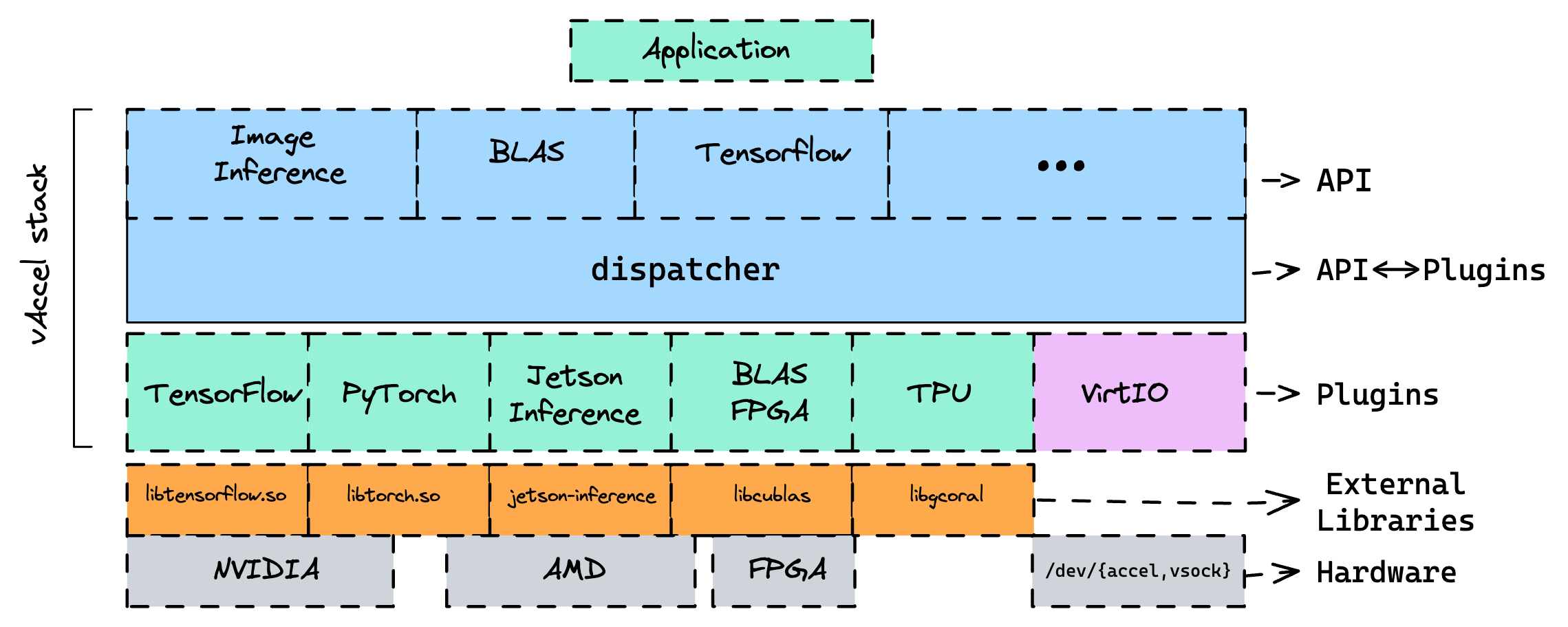
vAccel is a software framework to expose hardware acceleration functionality to
workloads that do not have direct access to an acceleration device. vAccel
features a modular design where runtime plugins implement API operations.
Figure 1 shows the software stack for the core vAccel library, along with a
number of plugins and their accompanying external libraries.
Apart from “hardware” plugins (that implement the API operations in some sort of acceleration library, eg CUDA, OpenCL etc.), vAccel features virtual plugins that are able to forward requests to a remote Host. This functionality makes it an open-ended API remoting framework. Based on the transport plugin (virtio or vsock) multiple setups can be enabled, making it ideal to use on VMs or on resource-constrained devices for remote execution. You can find more info about vAccel in the vAccel docs website.
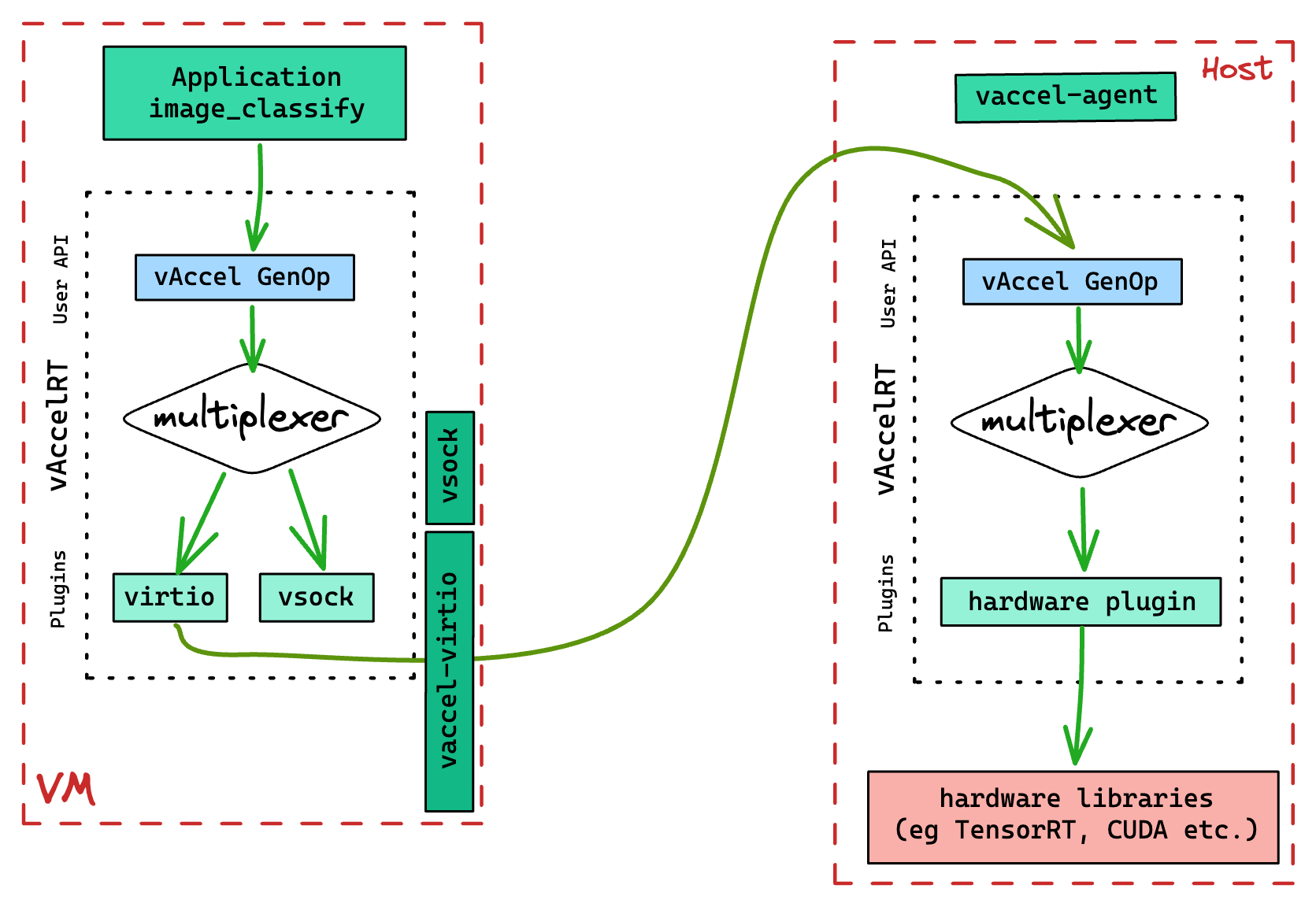
The socket mode of vAccel for remote operations of vAccel works as follows:
- the Host component (direct access to an accelerator), listens for requests using a predefined protocol (over gRPC) and issues vAccel API calls to the core vAccelRT library.
- the Remote/Guest component (no direct access to an accelerator), forwards requests to the Host component via a gRPC channel and receives results from the execution.
At the moment, the Host component is a simple gRPC agent (vaccel-agent) and
the Remote/Guest component is a vAccel plugin (libvaccel-vsock.so). A logical
diagram of the execution flow for a VM workload taking advantage of the vAccel
framework to run accelerated operations is shown in Figure 2.
kata-vAccel
Integrating the vAccel framework to a sandboxed container runtime removes the
need for complicated passthrough setups. No kernel prerequisites are needed
(apart from the VSOCK options which is by-default enabled in most sandboxed
container runtimes).
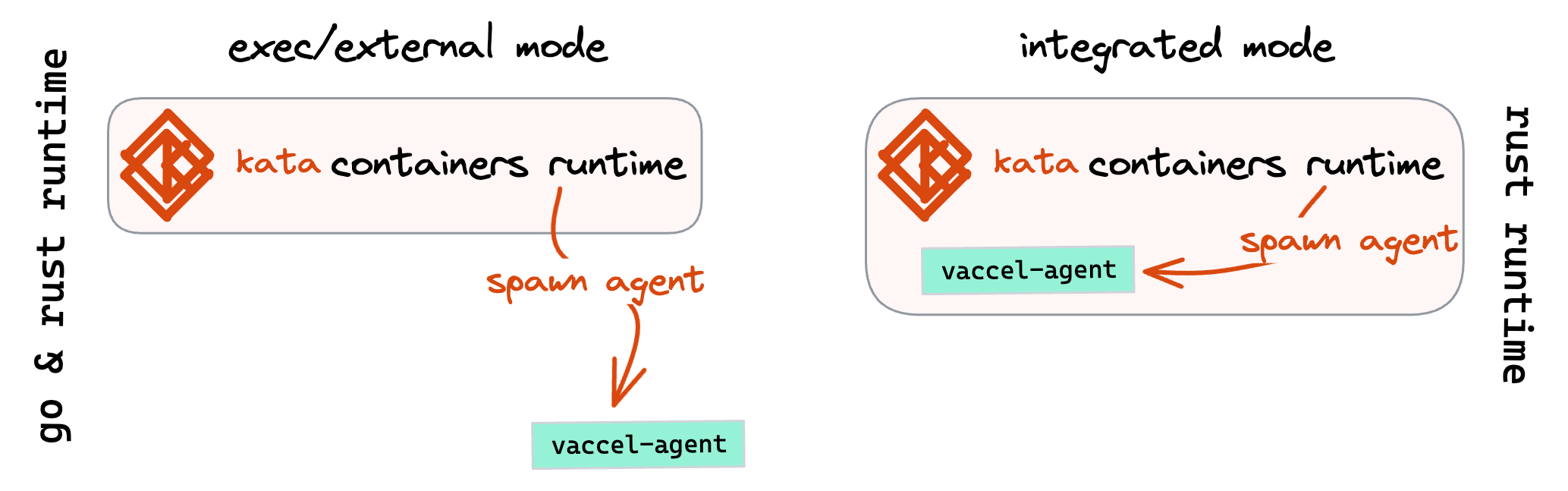
Currently, there are two modes for kata-vAccel (Figure 3): (a) the first one,
exec/external mode, supporting both runtime variants of kata-containers (Go
and Rust), spawns the vaccelrt-agent as an external binary, listening to the
vsock socket available for the kata-agent component of the container runtime;
(b) the second mode, integrated is only supported for the rust runtime
variant of kata-containers and embeds the functionality of the vaccelrt-agent
into the runtime, allowing better control and sandboxing of the components
running on the host system.
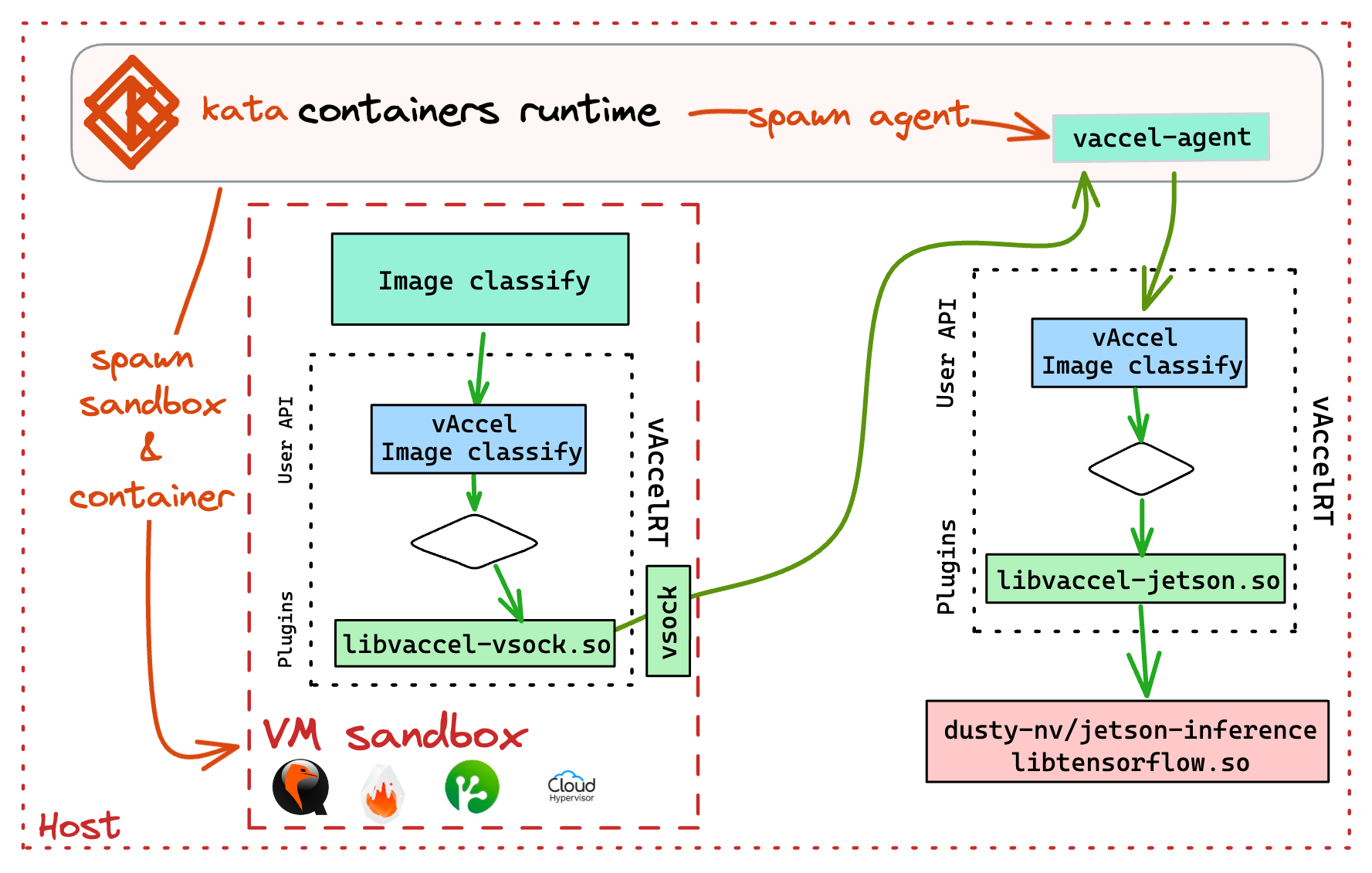
An overview of the execution flow for a vAccel-enabled
sandboxed container running on kata-containers is shown in Figure 4.
kata-containers binary installation
The steps to install the stock kata-containers runtime are shown below:
Get the release tarball:
wget https://github.com/kata-containers/kata-containers/releases/download/3.2.0-rc0/kata-static-3.2.0-rc0-arm64.tar.xz
Unpack it in a temporary directory:
mkdir /tmp/kata-release
xzcat kata-static-3.2.0-rc0-arm64.tar.xz | tar -xvf - -C /tmp/kata-release
You should be presented with the following directory structure:
# tree -d /tmp/kata-release/
/tmp/kata-release/
└── opt
    └── kata
        ├── bin
        ├── libexec
        ├── runtime-rs
        │   └── bin
        └── share
            ├── bash-completion
            │   └── completions
            ├── defaults
            │   └── kata-containers
            ├── kata-containers
            └── kata-qemu
                └── qemu
                    └── firmware

15 directories
Move the files to /opt/kata (This is a hard requirement, as all config files assume this folder):
rsync -oagxvPH /tmp/kata-release/opt/kata /opt/
rm -rf /tmp/kata-release
Create helper files for the kata VMMs you would like to try out:
Cloud-hypervisor:
cat > /usr/local/bin/containerd-shim-kata-clh-v2 << EOF
#!/bin/bash
KATA_CONF_FILE=/opt/kata/share/defaults/kata-containers/configuration-clh.toml /opt/kata/bin/containerd-shim-kata-v2 $@
EOF
Dragonball:
cat > /usr/local/bin/containerd-shim-kata-rs-v2 << EOF
#!/bin/bash
KATA_CONF_FILE=/opt/kata/share/defaults/kata-containers/configuration-dragonball.toml /opt/kata/runtime-rs/bin/containerd-shim-kata-v2 $@
EOF
AWS Firecracker:
cat > /usr/local/bin/containerd-shim-kata-fc-v2 << EOF
#!/bin/bash
KATA_CONF_FILE=/opt/kata/share/defaults/kata-containers/configuration-fc.toml /opt/kata/bin/containerd-shim-kata-v2 $@
EOF
QEMU:
cat > /usr/local/bin/containerd-shim-kata-qemu-v2 << EOF
#!/bin/bash
KATA_CONF_FILE=/opt/kata/share/defaults/kata-containers/configuration-qemu.toml /opt/kata/bin/containerd-shim-kata-v2 $@
EOF
For each of the VMMs you need an entry in the /etc/containerd/config.toml file:
       [plugins."io.containerd.grpc.v1.cri".containerd.runtimes.kata-fc]
          privileged_without_host_devices = true
          privileged_without_host_devices_all_devices_allowed = false
          runtime_type = "io.containerd.kata-fc.v2"
          snapshotter = "devmapper"
          pod_annotations = ["*"]
          container_annotations = ["*"]

       [plugins."io.containerd.grpc.v1.cri".containerd.runtimes.kata-rs]
          privileged_without_host_devices = false
          privileged_without_host_devices_all_devices_allowed = false
          runtime_type = "io.containerd.kata-rs.v2"
          #snapshotter = "devmapper"
          pod_annotations = ["*"]
          container_annotations = ["*"]

       [plugins."io.containerd.grpc.v1.cri".containerd.runtimes.kata-clh]
          privileged_without_host_devices = false
          privileged_without_host_devices_all_devices_allowed = false
          runtime_type = "io.containerd.kata-clh.v2"
          pod_annotations = ["*"]
          container_annotations = ["*"]

       [plugins."io.containerd.grpc.v1.cri".containerd.runtimes.kata-qemu]
          privileged_without_host_devices = false
          privileged_without_host_devices_all_devices_allowed = false
          runtime_type = "io.containerd.kata-qemu.v2"
          pod_annotations = ["*"]
          container_annotations = ["*"]
Note: for AWS Firecracker, the only supported snapshotter is devmapper.
Make sure you follow the
instructions to setup
it correctly in containerd.
Restart containerd:
systemctl restart containerd
You should now be able to spawn a stock kata-container using one of the VMM configurations above:
$ sudo nerdctl run --rm -it --runtime io.containerd.kata-fc.v2 --snapshotter devmapper ubuntu:latest uname -a
Linux d13db14b0c9a 5.15.26 #2 SMP Fri Apr 21 05:05:44 BST 2023 aarch64 aarch64 aarch64 GNU/Linux
Enable vAccel on the kata runtime
To enable vAccel, we need to add a custom kata runtime binary that instantiates
the vaccel-agent alongside the container spawn.
For now, we build binaries for x86_64 and aarch64:
Go runtime
For the go runtime (kata-fc):
wget https://s3.nbfc.io/nbfc-assets/github/vaccel-go-lib/aarch64/containerd-shim-kata-v2 -O /opt/kata/bin/containerd-shim-kata-vaccel-v2
chmod +x /opt/kata/bin/containerd-shim-kata-vaccel-v2
wget https://s3.nbfc.io/nbfc-assets/github/vaccel-go-lib/toml/configuration-fc-vaccel.toml -O /opt/kata/share/defaults/kata-containers/configuration-fc-vaccel.toml
The next step is to setup helper scripts like above.
cat > /usr/local/bin/containerd-shim-kata-fc-vaccel-v2 << EOF
#!/bin/bash
KATA_CONF_FILE=/opt/kata/share/defaults/kata-containers/configuration-fc-vaccel.toml /opt/kata/bin/containerd-shim-kata-vaccel-v2 $@
EOF
and add the runtime to /etc/containerd/config.toml:
       [plugins."io.containerd.grpc.v1.cri".containerd.runtimes.kata-fc-vaccel]
          privileged_without_host_devices = true
          privileged_without_host_devices_all_devices_allowed = true
          runtime_type = "io.containerd.kata-fc-vaccel.v2"
          snapshotter = "devmapper"
          pod_annotations = ["*"]
          container_annotations = ["*"]
Rust runtime
For the rust runtime (kata-rs)
wget https://s3.nbfc.io/nbfc-assets/github/vaccel-rs-lib/shim/main/aarch64/containerd-shim-kata-v2 -O /opt/kata/runtime-rs/bin/containerd-shim-kata-vaccel-v2
chmod +x /opt/kata/runtime-rs/bin/containerd-shim-kata-vaccel-v2
wget https://s3.nbfc.io/nbfc-assets/github/vaccel-rs-lib/toml/main/aarch64/configuration-dragonball.toml -O /opt/kata/share/defaults/kata-containers/configuration-dbs-vaccel.toml
The next step is to setup helper scripts like above.
Dragonball with vAccel:
cat > /usr/local/bin/containerd-shim-kata-rs-vaccel-v2 << EOF
#!/bin/bash
KATA_CONF_FILE=/opt/kata/share/defaults/kata-containers/configuration-dbs-vaccel.toml /opt/kata/runtime-rs/bin/containerd-shim-kata-vaccel-v2 $@
EOF
and add the runtime to /etc/containerd/config.toml:
       [plugins."io.containerd.grpc.v1.cri".containerd.runtimes.kata-rs-vaccel]
          privileged_without_host_devices = false
          privileged_without_host_devices_all_devices_allowed = false
          runtime_type = "io.containerd.kata-rs-vaccel.v2"
          #snapshotter = "devmapper"
          pod_annotations = ["*"]
          container_annotations = ["*"]
We should now be able to spawn a vAccel-enabled kata container with both go and rust runtimes:
Go:
$ nerdctl run --runtime io.containerd.kata-fc-vaccel.v2  --rm -it --snapshotter devmapper harbor.nbfc.io/nubificus/test-vaccel:latest /bin/bash
root@bce78aa7d1b4:/#
Rust:
$ nerdctl run --runtime io.containerd.kata-rs-vaccel.v2  --rm   -it harbor.nbfc.io/nubificus/test-vaccel:latest /bin/bash
root@2ce045d042bc:/#
Install and Setup vAccel and the jetson-inference plugin on the host
Setup vAccel
To install vAccel on the Orin we need to download the core runtime library, the agent and setup the jetson plugin. For a binary install, you can use the following snippet:
wget https://s3.nbfc.io/nbfc-assets/github/vaccelrt/main/aarch64/Release-deb/vaccel-0.5.0-Linux.deb
wget https://s3.nbfc.io/nbfc-assets/github/vaccelrt/agent/main/aarch64/Release-deb/vaccelrt-agent-0.3.6-Linux.deb
wget https://s3.nbfc.io/nbfc-assets/github/vaccelrt/plugins/jetson_inference/main/aarch64/Release-deb/vaccelrt-plugin-jetson-0.1.0-Linux.deb
dpkg -i vaccel-0.5.0-Linux.deb
dpkg -i vaccelrt-agent-0.3.6-Linux.deb
dpkg -i vaccelrt-plugin-jetson-0.1.0-Linux.deb
To be able to use the vAccel jetson-inference plugin, we need to install the
jetson-inference framework on the host system.
Setup jetson-inference on the Orin
We follow the installation instructions from dusty-nv/jetson-inference.
TL;DR:
git clone https://github.com/dusty-nv/jetson-inference --depth 1
cd jetson-inference
git submodule update --init
mkdir build && cd build
cmake ../ -DBUILD_INTERACTIVE=OFF
make && make install
Make sure you link the models to a directory in
/usr/local/share/imagenet-models, as this is the default path where the
vAccel jetson plugin looks for them:
mkdir /usr/local/share/imagenet-models
ln -s $PWD/../data/networks /usr/local/share/imagenet-models/
For more info on a full jetson-inference vaccel example, have a look at the vAccel docs.
Configure the container runtime to use vAccel
Now that we have kata containers setup and vAccel installed, let’s configure the runtime!
Make sure you specify the relevant vaccel backend/plugins in the kata
configuration file. As mentioned above, there are two modes of operation
supported in the kata runtime for the vaccelrt-agent:
(a) external: the kata runtime spawns the vaccelrt-agent binary, as an external
application. The setup for the host vAccel plugins is done in the kata
configuration file.
(b) integrated: the kata runtime includes the vaccelrt-agent functionality,
embedded in the runtime code. The setup for the host vAccel plugins is done in
the helper script, as an environment variable (VACCEL_BACKENDS).
To configure the system for mode (a), for the go runtime we edit
/opt/kata/share/defaults/kata-containers/configuration-fc-vaccel.toml and add
the jetson plugin before noop (default/debug) plugin:
@@ -54,7 +54,7 @@
 # vaccel_guest_backend can be one of "virtio" or "vsock"
 # Your distribution recommends: vaccel_host_backend = noop
 # Your distribution recommends: vaccel_guest_backend = vsock
-vaccel_host_backends = "noop"
+vaccel_host_backends = "jetson,noop"
 vaccel_guest_backend = "vsock"

 # If vaccel_guest_backend=vsock specify the vAccel Agent vsock port
For the rust runtime, we edit the /opt/kata/share/defaults/kata-containers/configuration-dbs-vaccel.toml file as follows:
...
agent_path= "/usr/local/bin/vaccelrt-agent"
debug= "1"
backends= "jetson,noop"
backends_library= "/usr/local/lib/"
endpoint_port= "2048"
execution_type= "exec"
...
For mode (b), we do:
agent_path= ""
debug= "1"
backends= ""
backends_library= "/usr/local/lib/"
endpoint_port= "2048"
execution_type= "integrated"
and edit the helper script to specify the plugins:
cat > /usr/local/bin/containerd-shim-kata-rs-vaccel-v2 << EOF
#!/bin/bash
VACCEL_BACKENDS=/usr/local/lib/libvaccel-jetson.so:/usr/local/lib/libvaccel-noop.so KATA_CONF_FILE=/opt/kata/share/defaults/kata-containers/configuration-dbs-vaccel.toml /opt/kata/runtime-rs/bin/containerd-shim-kata-vaccel-v2 $@
EOF
Spawn a vAccel-enabled sandboxed container
We are now ready to spawn a vAccel-enabled container. We already have a test container image, but if you would like to build your own, the Dockerfile is the one below:
FROM ubuntu:latest

RUN apt update && apt install -y wget && \
	wget https://s3.nbfc.io/nbfc-assets/github/vaccelrt/master/aarch64/Release-deb/vaccel-0.5.0-Linux.deb && \
	wget https://s3.nbfc.io/nbfc-assets/github/vaccelrt/plugins/vsock/master/aarch64/Release-deb/vaccelrt-plugin-vsock-0.1.0-Linux.deb && \
	dpkg -i vaccel-0.5.0-Linux.deb vaccelrt-plugin-vsock-0.1.0-Linux.deb

ENV VACCEL_DEBUG_LEVEL=4
ENV VACCEL_BACKENDS=/usr/local/lib/libvaccel-vsock.so
build like this:
docker build -t vaccel-test-container:aarch64 -f Dockerfile .
Essentially, it installs the vAccel core library, and the vsock plugin that
communicates with the vAccel agent running on the host (spawned using the modes
described above).
$ sudo nerdctl run --runtime io.containerd.kata-rs-vaccel.v2  --rm  -it nubificus/vaccel-test-container:latest /bin/bash
root@23a8738e14a8:/#
Let’s get an image:
$ wget https://upload.wikimedia.org/wikipedia/commons/b/bd/Golden_Retriever_Dukedestiny01_drvd.jpg
--2023-09-17 17:48:09--  https://upload.wikimedia.org/wikipedia/commons/b/bd/Golden_Retriever_Dukedestiny01_drvd.jpg
Resolving upload.wikimedia.org (upload.wikimedia.org)... 185.15.59.240, 2a02:ec80:300:ed1a::2:b
Connecting to upload.wikimedia.org (upload.wikimedia.org)|185.15.59.240|:443... connected.
HTTP request sent, awaiting response... 200 OK
Length: 165000 (161K) [image/jpeg]
Saving to: 'Golden_Retriever_Dukedestiny01_drvd.jpg'

Golden_Retriever_Dukedestiny01_drvd.jpg        100%[==================================================================================================>] 161.13K   701KB/s    in 0.2s

2023-09-17 17:48:14 (701 KB/s) - 'Golden_Retriever_Dukedestiny01_drvd.jpg' saved [165000/165000]
and try to issue a classify operation using vAccel’s jetson-inference backend:
root@2ce045d042bc:/# /usr/local/bin/classify Golden_Retriever_Dukedestiny01_drvd.jpg 1
Initialized session with id: 1
Image size: 165000B
classification tags: 86.768% golden retriever
Awesome, right?! We are able to use hardware acceleration on a sandboxed
container that does not have direct access to the accelerator device. Stay
tuned for more info on our progress with kata-containers and vAccel!