Knative: Serverless Computing in K8s (part I)
Serverless computing is a revolutionary approach to cloud computing that allows developers to focus solely on writing and deploying code without having to manage server infrastructure.In a traditional server-based model, developers need to consider and manage the servers that will run their applications.However, with serverless computing, developers can deploy their code as self-contained functions or services that are automatically run and scaled.This enables them to build and deploy applications quickly, without worrying about the underlying infrastructure.Several frameworks have emerged to facilitate serverless computing, including AWS Lambda, Google Cloud Functions, and Microsoft Azure Functions. One notable framework is Knative, which builds upon the concepts of serverless computing and provides additional features and functionalities.In the following blog, we will delve deeper into Knative.
Knative is an open source platform built on top of Kubernetes to facilitate the deployment, scaling, and management of serverless workloads.It was initially released in the open-source world by Google in 2014 and has since been contributed to by over 50 companies including IBM, Red Hat and SAP.
Knative aims to simplify Kubernetes adoption for serverless computing.It provides best practices to streamline deploying container-based serverless applications on Kubernetes clusters.This enables developers to focus on writing code without worrying about infrastructure concerns like auto-scaling, routing, monitoring etc.
Knative serves as a Kubernetes extension by providing tools and abstractions that make it easier to deploy and manage containerized workloads natively on Kubernetes.Over the years, usage of containers in software development has increased rapidly.Knative enhances the developer experience on Kubernetes by packaging code into containers and managing their execution.
Knative has three main components that provide the core functionality for deploying and running serverless workloads on Kubernetes:
1. Build :
The Knative Build component automates the process of converting source code into containers.The build component can convert publicly accessible source codes into containers.In this mode, Knative is not only flexible, but can be configured to meet specific requirements.It also supports various build strategies and can automatically rebuild and update images when the source code changes.
2. Serving :
This component focuses on the development and scaling of stateless applications known as “services”. Knative Serving utilizes a set of Kubernets called Custom Resource Definitions (CRDs).These resources are used to define and control how the serverless workload behaves in the cluster.
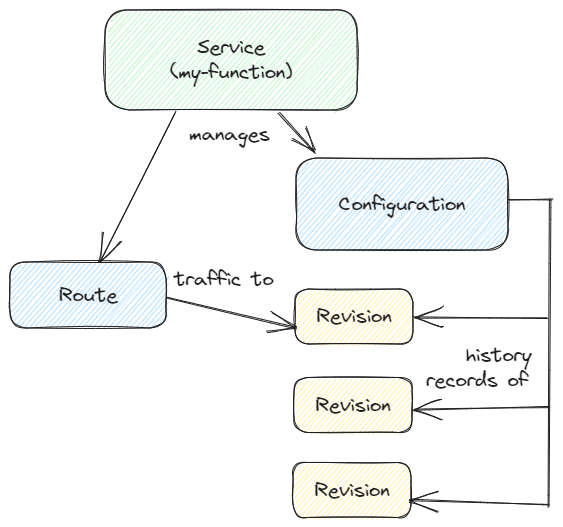
The main resources of Knative Serving are Services, Routes, Configurations, and Revisions:
• Services: Autonomously manages the entire lifecycle of the workload. Controls the creation of other objects to ensure that the application has a Route,a Configuration,and a Revision .
• Routes: Corresponds to an endpoint of the network or to several revisions.
• Configurations: Maintains the desired state for the application.Modifying the configuration creates a new revision.
• Revisions: It is a snapshot (at a specific moment) of the code and Configurations for each modification made to the workload.Revisions are immutable objects and can be persisted as long as they are useful.
3. Eventing :
Eventing describes the functionality of Knative that allows it to define the behavior of a container based on specific events. That is, different events can trigger specific container-based operations.
Now let’s see how to install knative in a k8s cluster!
Installing Knative Serving
Prerequisites
- We need to install kubectl.
- A Kubernetes cluster is required for the installation.(we tested this on Kubernetes v1.24.)
- For the Kubernetes cluster, ensure it has access to the internet.
Let’s start !
First install brew to your system.
- Run the update commands
sudo apt update
sudo apt-get install build-essential
- Install Git
sudo apt install git -y
- Run Homebrew installation script
/bin/bash -c "$(curl -fsSL https://raw.githubusercontent.com/Homebrew/install/HEAD/install.sh)"
- Add Homebrew to your PATH
(echo; echo 'eval "$(/home/linuxbrew/.linuxbrew/bin/brew shellenv)"') >> /home/$USER/.bashrc
eval "$(/home/linuxbrew/.linuxbrew/bin/brew shellenv)"
- Check system for potential problems
brew doctor
Verifying image signatures
For cosign:
brew install cosign
and check the version with command:
cosign version
Output:
ubuntuVM:~$ cosign version
  ______   ______        _______. __    _______ .__   __.
 /      | /  __  \      /       ||  |  /  _____||  \ |  |
|  ,----'|  |  |  |    |   (----`|  | |  |  __  |   \|  |
|  |     |  |  |  |     \   \    |  | |  | |_ | |  . `  |
|  `----.|  `--'  | .----)   |   |  | |  |__| | |  |\   |
 \______| \______/  |_______/    |__|  \______| |__| \__|
cosign: A tool for Container Signing, Verification and Storage in an OCI registry.

GitVersion:    2.2.0
GitCommit:     546f1c5b91ef58d6b034a402d0211d980184a0e5
GitTreeState:  "clean"
BuildDate:     2023-08-31T18:52:52Z
GoVersion:     go1.21.0
Compiler:      gc
Platform:      linux/amd64
For jq:
sudo apt-get install jq -y
and check the version with:
jq --version
Output:
ubuntuVM:~$ jq --version
jq-1.6
- Extract the images from a manifeset and verify the signatures.
curl -sSL https://github.com/knative/serving/releases/download/knative-v1.10.1/serving-core.yaml \
  | grep 'gcr.io/' | awk '{print $2}' | sort | uniq \
  | xargs -n 1 \
    cosign verify -o text \
      --certificate-identity=signer@knative-releases.iam.gserviceaccount.com \
      --certificate-oidc-issuer=https://accounts.google.com
Output:
Verification for gcr.io/knative-releases/knative.dev/serving/cmd/webhook@sha256:ce5f0144cf58b25fcf4027f69b7a0d616c7b72e7ff4e2a133a04a2b3c35fd7da --
The following checks were performed on each of these signatures:
  - The cosign claims were validated
  - Existence of the claims in the transparency log was verified offline
  - The code-signing certificate was verified using trusted certificate authority certificates
Certificate subject: signer@knative-releases.iam.gserviceaccount.com
Certificate issuer URL: https://accounts.google.com
{"critical":{"identity":{"docker-reference":"gcr.io/knative-releases/knative.dev/serving/cmd/webhook"},"image":{"docker-manifest-digest":"sha256:ce5f0144cf58b25fcf4027f69b7a0d616c7b72e7ff4e2a133a04a2b3c35fd7da"},"type":"cosign container image signature"},"optional":null}
Install the Knative Serving component
- Install the required custom resources by running the command:
kubectl apply -f https://github.com/knative/serving/releases/download/knative-v1.10.2/serving-crds.yaml
Output:
ubuntu@ubuntuVM:~$ kubectl apply -f https://github.com/knative/serving/releases/download/knative-v1.10.2/serving-crds.yaml
customresourcedefinition.apiextensions.k8s.io/certificates.networking.internal.knative.dev created
customresourcedefinition.apiextensions.k8s.io/configurations.serving.knative.dev created
customresourcedefinition.apiextensions.k8s.io/clusterdomainclaims.networking.internal.knative.dev created
customresourcedefinition.apiextensions.k8s.io/domainmappings.serving.knative.dev created
customresourcedefinition.apiextensions.k8s.io/ingresses.networking.internal.knative.dev created
customresourcedefinition.apiextensions.k8s.io/metrics.autoscaling.internal.knative.dev created
customresourcedefinition.apiextensions.k8s.io/podautoscalers.autoscaling.internal.knative.dev created
customresourcedefinition.apiextensions.k8s.io/revisions.serving.knative.dev created
customresourcedefinition.apiextensions.k8s.io/routes.serving.knative.dev created
customresourcedefinition.apiextensions.k8s.io/serverlessservices.networking.internal.knative.dev created
customresourcedefinition.apiextensions.k8s.io/services.serving.knative.dev created
customresourcedefinition.apiextensions.k8s.io/images.caching.internal.knative.dev created
ubuntu@ubuntuVM:~$
- Install the core components of Knative Serving
kubectl apply -f https://github.com/knative/serving/releases/download/knative-v1.10.2/serving-core.yaml
Output:
ubuntuVM:~$ kubectl apply -f https://github.com/knative/serving/releases/download/knative-v1.10.2/serving-core.yaml
namespace/knative-serving created
clusterrole.rbac.authorization.k8s.io/knative-serving-aggregated-addressable-resolver created
clusterrole.rbac.authorization.k8s.io/knative-serving-addressable-resolver created
clusterrole.rbac.authorization.k8s.io/knative-serving-namespaced-admin created
clusterrole.rbac.authorization.k8s.io/knative-serving-namespaced-edit created
clusterrole.rbac.authorization.k8s.io/knative-serving-namespaced-view created
clusterrole.rbac.authorization.k8s.io/knative-serving-core created
clusterrole.rbac.authorization.k8s.io/knative-serving-podspecable-binding created
serviceaccount/controller created
clusterrole.rbac.authorization.k8s.io/knative-serving-admin created
clusterrolebinding.rbac.authorization.k8s.io/knative-serving-controller-admin created
clusterrolebinding.rbac.authorization.k8s.io/knative-serving-controller-addressable-resolver created
customresourcedefinition.apiextensions.k8s.io/images.caching.internal.knative.dev unchanged
customresourcedefinition.apiextensions.k8s.io/certificates.networking.internal.knative.dev unchanged
customresourcedefinition.apiextensions.k8s.io/configurations.serving.knative.dev unchanged
customresourcedefinition.apiextensions.k8s.io/clusterdomainclaims.networking.internal.knative.dev unchanged
customresourcedefinition.apiextensions.k8s.io/domainmappings.serving.knative.dev unchanged
customresourcedefinition.apiextensions.k8s.io/ingresses.networking.internal.knative.dev unchanged
customresourcedefinition.apiextensions.k8s.io/metrics.autoscaling.internal.knative.dev unchanged
customresourcedefinition.apiextensions.k8s.io/podautoscalers.autoscaling.internal.knative.dev unchanged
customresourcedefinition.apiextensions.k8s.io/revisions.serving.knative.dev unchanged
customresourcedefinition.apiextensions.k8s.io/routes.serving.knative.dev unchanged
customresourcedefinition.apiextensions.k8s.io/serverlessservices.networking.internal.knative.dev unchanged
customresourcedefinition.apiextensions.k8s.io/services.serving.knative.dev unchanged
secret/serving-certs-ctrl-ca created
secret/knative-serving-certs created
secret/control-serving-certs created
secret/routing-serving-certs created
image.caching.internal.knative.dev/queue-proxy created
configmap/config-autoscaler created
configmap/config-defaults created
configmap/config-deployment created
configmap/config-domain created
configmap/config-features created
configmap/config-gc created
configmap/config-leader-election created
configmap/config-logging created
configmap/config-network created
configmap/config-observability created
configmap/config-tracing created
horizontalpodautoscaler.autoscaling/activator created
poddisruptionbudget.policy/activator-pdb created
deployment.apps/activator created
service/activator-service created
deployment.apps/autoscaler created
service/autoscaler created
deployment.apps/controller created
service/controller created
deployment.apps/domain-mapping created
deployment.apps/domainmapping-webhook created
service/domainmapping-webhook created
horizontalpodautoscaler.autoscaling/webhook created
poddisruptionbudget.policy/webhook-pdb created
deployment.apps/webhook created
service/webhook created
validatingwebhookconfiguration.admissionregistration.k8s.io/config.webhook.serving.knative.dev created
mutatingwebhookconfiguration.admissionregistration.k8s.io/webhook.serving.knative.dev created
mutatingwebhookconfiguration.admissionregistration.k8s.io/webhook.domainmapping.serving.knative.dev created
secret/domainmapping-webhook-certs created
validatingwebhookconfiguration.admissionregistration.k8s.io/validation.webhook.domainmapping.serving.knative.dev created
validatingwebhookconfiguration.admissionregistration.k8s.io/validation.webhook.serving.knative.dev created
secret/webhook-certs created
ubuntu@ubuntuVM:~$
Install a networking layer
The following instructions are for installing a networking layer. (Install Kourier and enable its Knative integration)
- Install the Knative Kourier controller:
kubectl apply -f https://github.com/knative/net-kourier/releases/download/knative-v1.10.0/kourier.yaml
Output:
ubuntuVM:~$ kubectl apply -f https://github.com/knative/net-kourier/releases/download/knative-v1.10.0/kourier.yaml
namespace/kourier-system created
configmap/kourier-bootstrap created
configmap/config-kourier created
serviceaccount/net-kourier created
clusterrole.rbac.authorization.k8s.io/net-kourier created
clusterrolebinding.rbac.authorization.k8s.io/net-kourier created
deployment.apps/net-kourier-controller created
service/net-kourier-controller created
deployment.apps/3scale-kourier-gateway created
service/kourier created
service/kourier-internal created
horizontalpodautoscaler.autoscaling/3scale-kourier-gateway created
poddisruptionbudget.policy/3scale-kourier-gateway-pdb created
ubuntu@ubuntuVM:~$
- Configure Knative Serving to use Kourier by default:
kubectl patch configmap/config-network \
   --namespace knative-serving \
   --type merge \
   --patch '{"data":{"ingress-class":"kourier.ingress.networking.knative.dev"}}'
Output:
ubuntuVM:~$ kubectl patch configmap/config-network \
   --namespace knative-serving \
   --type merge \
   --patch '{"data":{"ingress-class":"kourier.ingress.networking.knative.dev"}}'
configmap/config-network patched
- Fetch the CNAME by running the command:
kubectl --namespace kourier-system get service kourier
Output:
kubectl --namespace kourier-system get service kourier
NAME      TYPE           CLUSTER-IP       EXTERNAL-IP   PORT(S)                      AGE
kourier   LoadBalancer   10.101.236.147   <pending>     80:30556/TCP,443:30311/TCP   110s
Verify the installation
Verify the installation with the command:
kubectl get pods -n knative-serving
Output:
ubuntuVM:~$ kubectl get pods -n knative-serving
NAME                                     READY   STATUS    RESTARTS   AGE
activator-86c78bb8f7-ph7h5               1/1     Running   0          4m38s
autoscaler-7c84b476b7-lvmr6              1/1     Running   0          4m38s
controller-7f594656c5-nsnpm              1/1     Running   0          4m38s
domain-mapping-864fb56bd6-vqpd5          1/1     Running   0          4m38s
domainmapping-webhook-5c969d8f6b-n4h9b   1/1     Running   0          4m37s
net-kourier-controller-f8d886c4d-z2vxl   1/1     Running   0          2m47s
webhook-5d44c4d7d9-8kznn                 1/1     Running   0          4m37s
ubuntu@ubuntuVM:~$
Now let’s see some examples for knative Function and Service.
Knative Functions
Knative Functions provides a simple programming model for enabling the deployment of Serverless functions , without requiring in-depth knowledge of Kubernetes, containers, or docker-files.
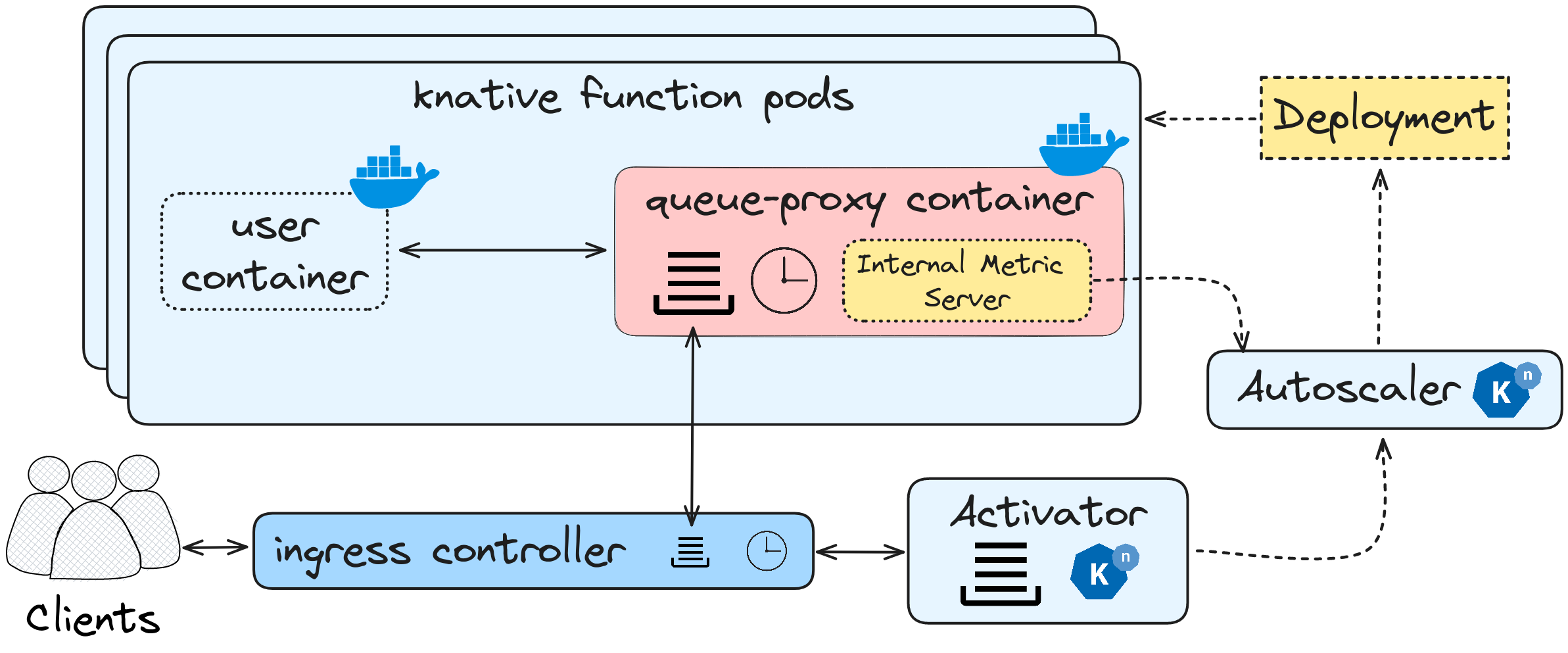
During the first invocation of a Knative Function, the clients send their requests to the ingress controller, which is located outside the Knative stack. The ingress controller acts as the entry point for the requests.From there, the ingress controller interacts with the activator component within the Knative stack.
The activator maintains a queue and handles the incoming requests from the clients.It then communicates with the Autoscaler, which is responsible for managing the scaling of Knative function pods.In the initial invocation, since there is no existing deployment available for the function, the Autoscaler creates a deployment file and spawns a Knative pod.
Inside the Knative pod, there is a qproxy container that plays a crucial role.The qproxy container is responsible for handling metrics, managing incoming requests, and coordinating the responses.It acts as an intermediary between the external requests and the user container where the actual user code runs.It ensures the proper flow of data and communication between the client’s request and the execution of the user code.
For subsequent invocations of the Knative Function, the process follows a similar flow.The requests from the clients continue to go through the ingress controller, which maps them to the queue-proxy controller.The queue-proxy controller, in turn, forwards the requests to the user container where the user code is executed.
Additionally, the qproxy container also collects and pushes metrics to the autoscaler.These metrics help the autoscaler in determining the appropriate scaling actions for the Knative function pods, enabling them to efficiently scale up or down based on the workload demands.
Overall, this flow illustrates how Knative Functions work, from the initial invocation to subsequent invocations, and the role of different components such as the ingress controller, activator, autoscaler, qproxy container, and user container.
Now to install Knative Functions, we execute the following commands:
brew tap knative-sandbox/kn-plugins

brew install func
Output:
ubuntuVM:~$ brew tap knative-sandbox/kn-plugins
Running `brew update --auto-update`...
==> Tapping knative-sandbox/kn-plugins
Cloning into '/home/linuxbrew/.linuxbrew/Homebrew/Library/Taps/knative-sandbox/homebrew-kn-plugins'...
remote: Enumerating objects: 595, done.
remote: Counting objects: 100% (213/213), done.
remote: Compressing objects: 100% (36/36), done.
remote: Total 595 (delta 189), reused 192 (delta 176), pack-reused 382
Receiving objects: 100% (595/595), 151.20 KiB | 1.12 MiB/s, done.
Resolving deltas: 100% (404/404), done.
Tapped 92 formulae (120 files, 383KB).

ubuntu@ubuntuVM:~$ brew install func
Running `brew update --auto-update`...
==> Fetching knative-sandbox/kn-plugins/func
==> Downloading https://github.com/knative/func/releases/download/knative-v1.11.0/func_linux_amd64
==> Downloading from https://objects.githubusercontent.com/github-production-release-asset-2e65be/242137258/8e91cca8-e0d6-409d-bf03-
############################################################################################################################# 100.0%
==> Installing func from knative-sandbox/kn-plugins
"Installing kn-func binary in /home/linuxbrew/.linuxbrew/Cellar/func/v1.11.0/bin"
"Installing func symlink in /home/linuxbrew/.linuxbrew/Cellar/func/v1.11.0/bin"
🍺  /home/linuxbrew/.linuxbrew/Cellar/func/v1.11.0: 4 files, 95.3MB, built in 2 seconds
==> Running `brew cleanup func`...
Disable this behaviour by setting HOMEBREW_NO_INSTALL_CLEANUP.
Hide these hints with HOMEBREW_NO_ENV_HINTS (see `man brew`).
ubuntu@ubuntuVM:~$
To create a go function run:
func create -l go knative-function-demo
to confirm that the function was created ,check her directory
ubuntuVM:~$ cd knative-function-demo
ubuntu@ubuntuVM:~/knative-function-demo$ ls
func.yaml  go.mod  handle.go  handle_test.go  README.md
Ιf modify the handle.go file like this:
package function

import (
        "context"
        "fmt"
        "net/http"

)

// Handle an HTTP Request.
func Handle(ctx context.Context, res http.ResponseWriter, req *http.Request) {
        /*
         * YOUR CODE HERE
         *
         * Try running `go test`.  Add more test as you code in `handle_test.go`.
         */

        fmt.Println("Received request")
        fmt.Println(prettyPrint(req))      // echo to local output
        fmt.Fprintf(res, prettyPrint(req)) // echo to caller
}

func prettyPrint(req *http.Request) string {

        return  " You are a demo "
}
and run the function (locally) with the command:
func run ––build ––registry {registry}
if everything goes well , the output will be:
ubuntuVM:~/knative-function-demo$ func run --build --registry panosmavrikos
 🙌 Function built: docker.io/panosmavrikos/knative-function-demo:latest
Initializing HTTP function
listening on http port 8080
Running on host port 8080
In a browser at http://localhost:8080 will see your function running.
knative-function-demo$ curl http://localhost:8080
You are a demo
In case we want a production solution, we have to build a Container image and use it to run our function. To build the container image run the following command with your registry :
func build ––image docker.io/panosmavrikos/knative-function-demo:latest
To deploy our function in a production environment, execute the command:
func ––namespace default deploy
Knative Service
To deploy a simple service in knative make a yaml file like this:
apiVersion: serving.knative.dev/v1
kind: Service
metadata:
  name: hello
spec:
  template:
    spec:
      containers:
        - image: ghcr.io/knative/helloworld-go:latest
          ports:
            - containerPort: 8080
          env:
            - name: TARGET
              value: "World"
and apply it
kubectl apply -f hello.yaml
Output:
service.serving.knative.dev/hello created
View a list of Knative Services by running the command:
kubectl get ksvc
Output:
ubuntuVM:~$ kubectl get ksvc
NAME    URL                                      LATESTCREATED   LATESTREADY   READY   REASON
hello   http://hello.default.svc.cluster.local   hello-00001     hello-00001   True
To access the Knative Service, open the previous URL in the browser or by executing the order:
curl http://hello.default.svc.cluster.local
Output:
Hello World!
Congratulations!!!